A Paper Calendar or a Shared Digital One? Choose by the Moment You Need to Remember
Compare a paper calendar with a shared digital calendar by visibility, portability, and ease of updates, then choose a format that keeps one household plan clear.
The community shuttle is due Thursday, but the appointment card says Wednesday. A paper calendar or shared digital calendar can help keep the plan straight, as long as the reminder appears where someone will notice it and the right person can update it. The best format depends on when and where your household needs the information.
Compare visibility, portability, and ease of updating. Then try one format with a single recurring plan before changing how the whole household keeps track.
Put the reminder where it will be seen
A paper calendar works well when the important moment happens in a shared space. Place it beside the kitchen table, near the home phone, or on the fridge if people already pause there. A large monthly grid makes appointments, visits, and regular outings easy to scan.
Choose roomy date boxes, write in plain language, and use a dark pen. If several people add plans, agree on a simple color key. Too many colors or tiny notes can make the calendar harder to read than a short list.
A digital calendar is easier to check away from home or while getting ready. A reminder can appear before an appointment, and a shared calendar lets a family member see the same plan. The alert helps only if notifications are enabled and the device is nearby, charged, and familiar to use.
Ask where the person is likely to be when they need the prompt. A fridge calendar may suit someone who plans at home; a phone alert may suit someone who needs a nudge while traveling.
Match portability to the day’s routine
Paper stays where it is posted. That can be useful because everyone who passes it sees the same information, and no one has to remember which device holds the plan. It is less useful for checking details from a waiting room, a neighbor’s home, or a passenger seat.
Digital calendars travel with a phone or tablet, so someone can check a location, time, or contact detail away from home. A shared calendar can also help a person arranging transportation see the plan without calling. Consider whether this access is convenient for the people involved rather than assuming every helper wants another app.
Portability has a trade-off. A phone screen may be difficult to read, or an alert may be easy to dismiss and forget. If the screen, sound, or touch controls are frustrating, a paper copy at home may be the better everyday reference.
Choose an update method the household can manage
Paper is simple to amend with a pen. Anyone who can reach the calendar can cross out a change and write the new plan, though an old entry may remain visible unless it is removed clearly. Agree to erase canceled plans fully and write changes in the same place.
Digital calendars let people edit a plan from different locations and share the change. That helps when schedules shift or one person coordinates rides and appointments. It also means everyone needs to know which calendar is authoritative and how to change an event without removing useful details or sending confusing notifications.
Do not choose digital just because it offers more features. If sharing setup, passwords, or editing takes more effort than writing down the plan, those features may not help. A paper calendar is not automatically simpler if no one remembers to check or update it.
Try one recurring plan before switching
Choose one event that repeats and matters to the people involved, such as a weekly library visit, a regular ride, or a standing family call. Keep the trial narrow: the aim is to make this plan visible and current, not to reorganize every appointment at once.
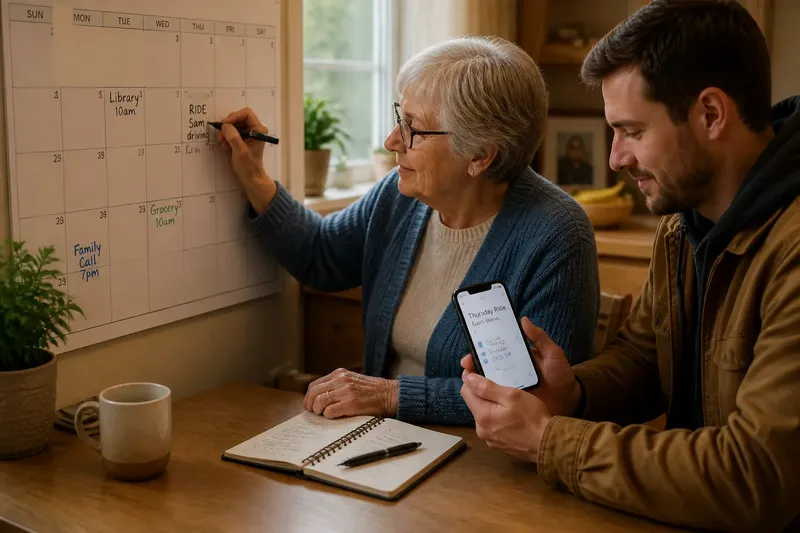
Say an older adult has a recurring Thursday ride, and a relative sometimes drives. They could write “Thursday ride, Sam driving” on a kitchen wall calendar and erase the entry if the ride changes. If Sam often needs the details away from home, they could instead create a shared digital event and agree that the older adult edits it. At the next planning conversation, both should be able to identify the ride and see whether its details changed; if either cannot, revise the wording, location, or update arrangement.
Before starting, decide where the reminder belongs and who keeps it current. After a few cycles, ask whether anyone missed the plan, struggled to find it, or hesitated to update it. Adjust the placement or wording before switching formats.
Keep the calendar useful without overmanaging it
Write events in language that answers the immediate question. “Ride to clinic, Sam driving” is easier to act on than a name or shorthand that only one person understands. Add the location or contact only when it helps someone carry out the plan.
For paper, reserve a consistent area for recurring plans and remove canceled entries cleanly. For digital, use a recognizable title and choose a reminder time that leaves room to prepare. Avoid duplicate entries in several calendars unless someone has a clear role in checking each one; conflicting versions create extra work.
It is not worth decorating the calendar, devising an elaborate color system, or entering every minor household activity just to make it look complete. A few readable, current plans are more useful than a packed page or a stream of phone alerts.
Which calendar fits your household’s routine?
Can a paper calendar work for more than one person?
Yes, if everyone knows where it is and how changes are recorded. Put it in a shared spot and use clear wording so a visitor or family member can understand an entry without decoding private shorthand.
Does a shared digital calendar require everyone to use the same phone?
No, but the people who need to see or edit the plan must have access on a device they can use. If account setup or access becomes a barrier, keep the arrangement simpler or use a visible paper calendar instead.
What if one person prefers paper and another prefers digital?
Let each person use a format they can manage, but agree on one source of truth for the recurring plan. One person might maintain the shared event while the other copies the confirmed date onto paper; settle changes together rather than leaving two conflicting versions.
How should the household handle a changed appointment?
Revise or remove the old entry where the plan is kept, then tell anyone who depends on the change. For a digital event, check that the new time and notification make sense; for paper, make the canceled plan unmistakable.
Make the reminder fit the person
A paper calendar or shared digital calendar is useful when it matches how the people involved notice information, carry it, and make changes. For one recurring household plan, choose the place or device that is easiest to check and assign a clear update routine. If you are choosing a paper calendar or shared digital calendar, start with the next event and make sure everyone who needs it can find the current details.